Business & Clients
Today's session and the whole season are the same question, answered at two different distances
From the FASTER syllabus: this article is taught in full in PT Manager, free with any FASTER course →
In short: Adapting one session to the person in front of you and shaping a whole season so an athlete peaks on time are the same question asked at two different distances: what should happen next, given everything true about this person right now. PT Manager's Build screen answers both from one place, moving between a single session, a 12-week plan and a full sport season.
The short version
Ask what changes for a client recovering from injury and you're answering a question about one session. Ask when an athlete should peak for their biggest competition and you're answering the same question at the scale of months. Both are asking the same thing: given everything true about this person right now, what should happen next. PT Manager's Build screen answers both from the same place, because splitting them into separate tools was never the honest way to do it.
Key Takeaways
- Adapting one session and shaping a whole season both start from the same read: what's true about this person right now.
- PT Manager's Build screen moves between a single session, a 12-week plan and a full sport season without switching tools.
- The session editor inside it holds exact structures, loads and rest per exercise, autosaved, so nothing gets lost between the idea and the session.
The same question at two distances
A trainer adapting a session for a sedentary client or one recovering from injury is reading close in: this person, this morning, this set. A coach planning when an athlete should peak for a competition is reading the same person from further back, across weeks instead of minutes. Neither read matters more than the other, and a trainer who's good at one and blind to the other is still missing half the job.
What the Build screen holds
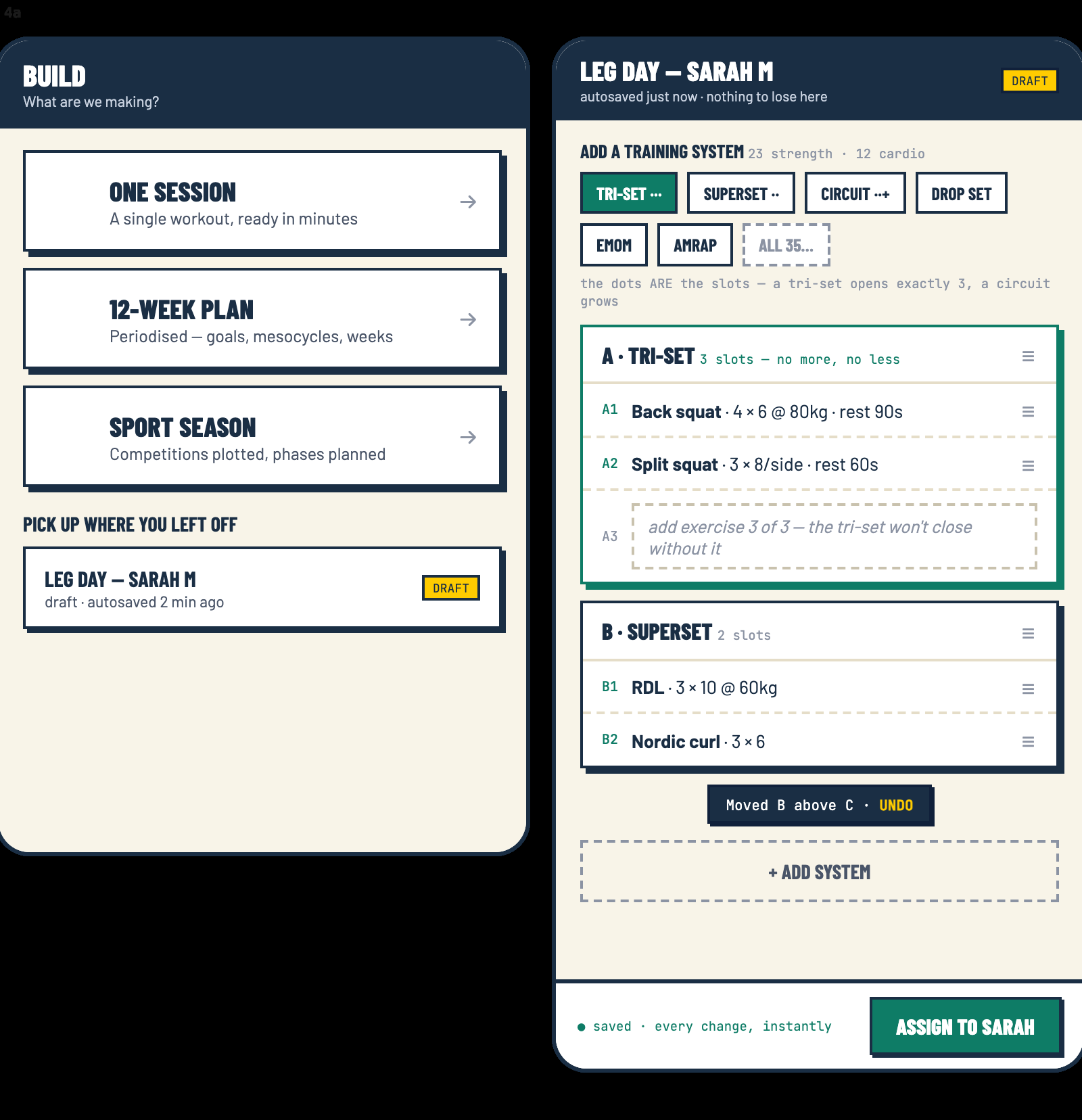
Open PT Manager to build something and the choice sits right there: One Session for a workout ready in minutes, a 12-Week Plan for periodised goals across mesocycles, or a full Sport Season with competitions plotted and phases planned. A draft picks up exactly where it was left, autosaved, so a half-built leg day is waiting rather than lost.
Inside a session, the editor works in real training structures, not a blank box: a tri-set that won't close until its three slots are filled, a superset, a circuit, a drop set, an EMOM or an AMRAP, each with load, reps and rest set per exercise. Move a block and it says so, with an undo sitting right there if it's wrong. Every change saves instantly, and assigning it to the client is one button once it's ready.
Why one screen, not three tools
The industry tends to sell programming software and season-planning software as separate products, because they're built by separate teams solving separate problems. A trainer doesn't experience it that way. The client in front of you today and the athlete you're building toward a competition are the same person, and a system that makes you re-enter them into two different tools is asking you to do the joining-up work that software should be doing for you.
What to do next
PT Manager opens the moment you sign up with FASTER, so you can explore the Build screen and everything in it before you've written a single session. Adding clients unlocks once you pass a course, either the Certified PT route from scratch or the Movement Trainer route if you're already qualified, and there's no fee for the service either way.
The FASTER Journal shares the next teaching point first. Sign up at /newsletter and it arrives the moment it is ready.
You just read one answer. The course is all of them.
PT Manager, free with any FASTER course — taught by the people who wrote it, with free return access for life. The price is on the page, payment plans at checkout, no sales calls.
Also worth a look: Level 4 Strength & Conditioning, for season and athlete planning.
See what the course covers →Frequently asked
Can I plan a single session and a whole sport season in the same tool?
Yes. PT Manager's Build screen offers One Session, a 12-Week Plan or a full Sport Season as three starting points, and drafts autosave so you can pick one back up later.
What does the session builder actually let me set?
Exact structures like tri-sets, supersets, circuits, drop sets, EMOMs and AMRAPs, with load, reps and rest per exercise, saved instantly as you build.
Do I need to finish a session in one sitting?
No, drafts hold your place and show as 'pick up where you left off' the next time you open PT Manager.
Reading this for your own training? Every trainer on the FASTER register has been assessed by us — search by town or speciality, free.
Find a FASTER trainer →